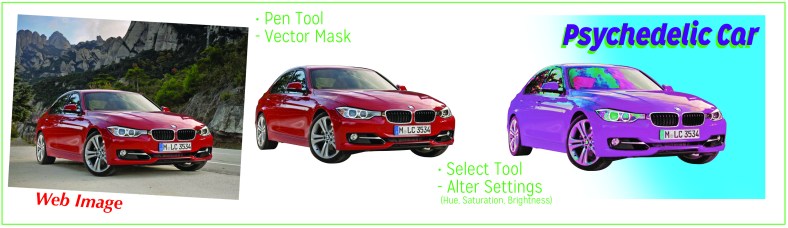
 Pull a photo, any photo, into Photoshop. Clip out the subject with a vector mask. Now, apply the filter, skew the settings, or adjust the levels. Shown below is what I came up with from the web, a picture of a car. The effects give a slick looking red car a psychedelic look. I did a layer of paint with the reddest reds selected and painted purple. The settings I changed were hue, saturation, and lightness.
Would I be able to replicate the effect with another photo? Factors such as light, angle, and subject surface would factor into the outcome of another photo. These are measurable levels, as well as levels that can be enhanced with Photoshop. For example, a less shiny surface could be enhanced by enhancing the contrast – manually or with an adjustment layer.
Tools I used are marked, which here are: Pen Tool to create a Vector Mask (create pen outline over the photo, then click the icon- dot on rectangle- at bottom of layers). Then, select the created object (on Mac, command click on Layer image box to select whole object) then create Adjustment Layer to change it up (options at bottom of Layer panel). Inspired by 70s culture/ pop art/ gloppy painting.
Pictures could be documented based on these settings, allowing for easy use of the pic, or adapting the settings to a new subject in a junction of art and technique.
WT
 westont17